A branch per ticket
Recognised by the ticket number in its name, or linked by hand.
GitHub and Bitbucket integration: see the branch, commits and pull request on every ticket
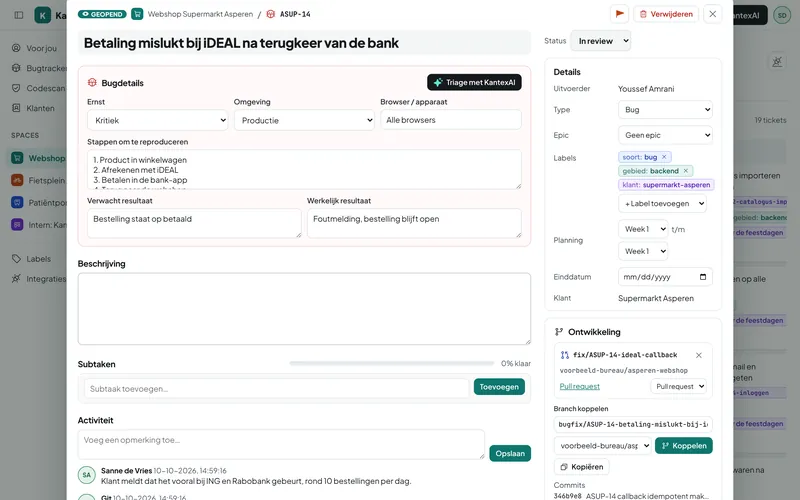
Connect GitHub or Bitbucket with a webhook. A ticket number in the branch name links the branch to the ticket. Commits and pull requests follow automatically, and with smart commits you update the ticket from your commit message.
Included in every plan, including Free
Add the webhook in GitHub or Bitbucket, with your own secret. Kantex rejects messages without a valid signature.
Create a branch such as feature/ASUP-12-login. On the first push Kantex links it to ASUP-12 and moves the ticket to In Progress.
An opened pull request moves the ticket to In Review. After the merge the branch is marked as merged.
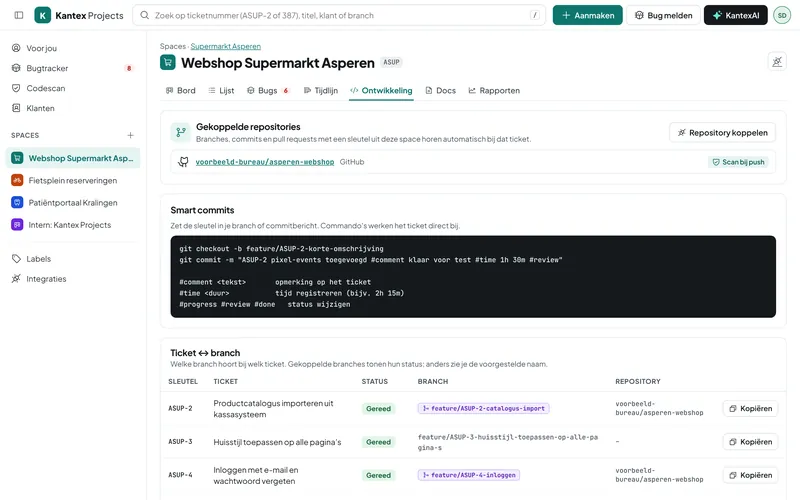
Recognised by the ticket number in its name, or linked by hand.
Every commit with a ticket number appears on the ticket, with author and link.
Pull request status on the ticket, and the ticket moved to In Review.
#comment, #time 1h 30m, #progress, #review and #done in your commit message.
Every ticket offers a branch name to copy, such as feature/ASUP-12-login.
A table per space with every ticket and its branches.
Currently with GitHub and Bitbucket Cloud. If you use GitLab or your own Git server, get in touch: we are happy to build the integration.
Then you link the branch by hand in the ticket. Every ticket also shows a suggested branch name to copy.
Not for the integration: that works with webhooks. Only for the code scan does Kantex fetch the changes from a push, using a token with read access.
Every feature, your own environment and a free switching service. No credit card needed.