Project management and bug tracking for agencies and software teams

Tickets, bugs and branches in one system. For agencies and software teams.

Kantex Projects is project management for teams that build software for clients. Each client gets their own space, there is a bug tracker with KantexAI, and every ticket shows the branch, commits and pull request that belong to it. Your clients report bugs in their own portal.

  • Free for up to 5 users
  • GitHub and Bitbucket
  • Hosted in the EU
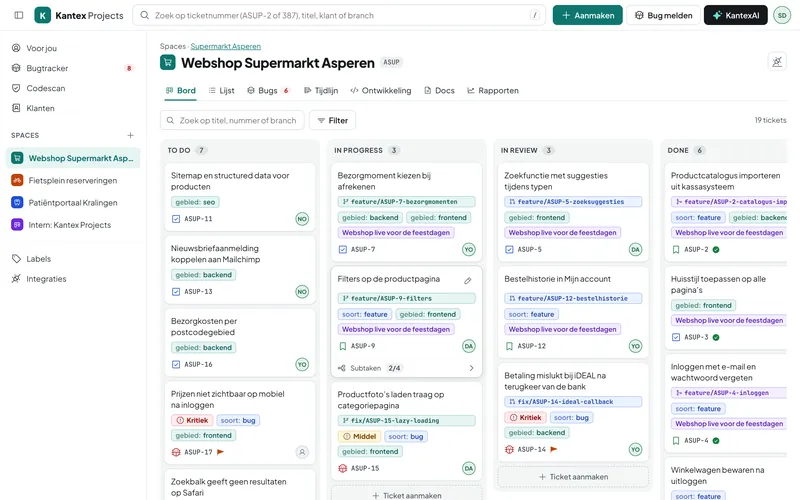
The Kantex Projects board with tickets, labels and linked branches
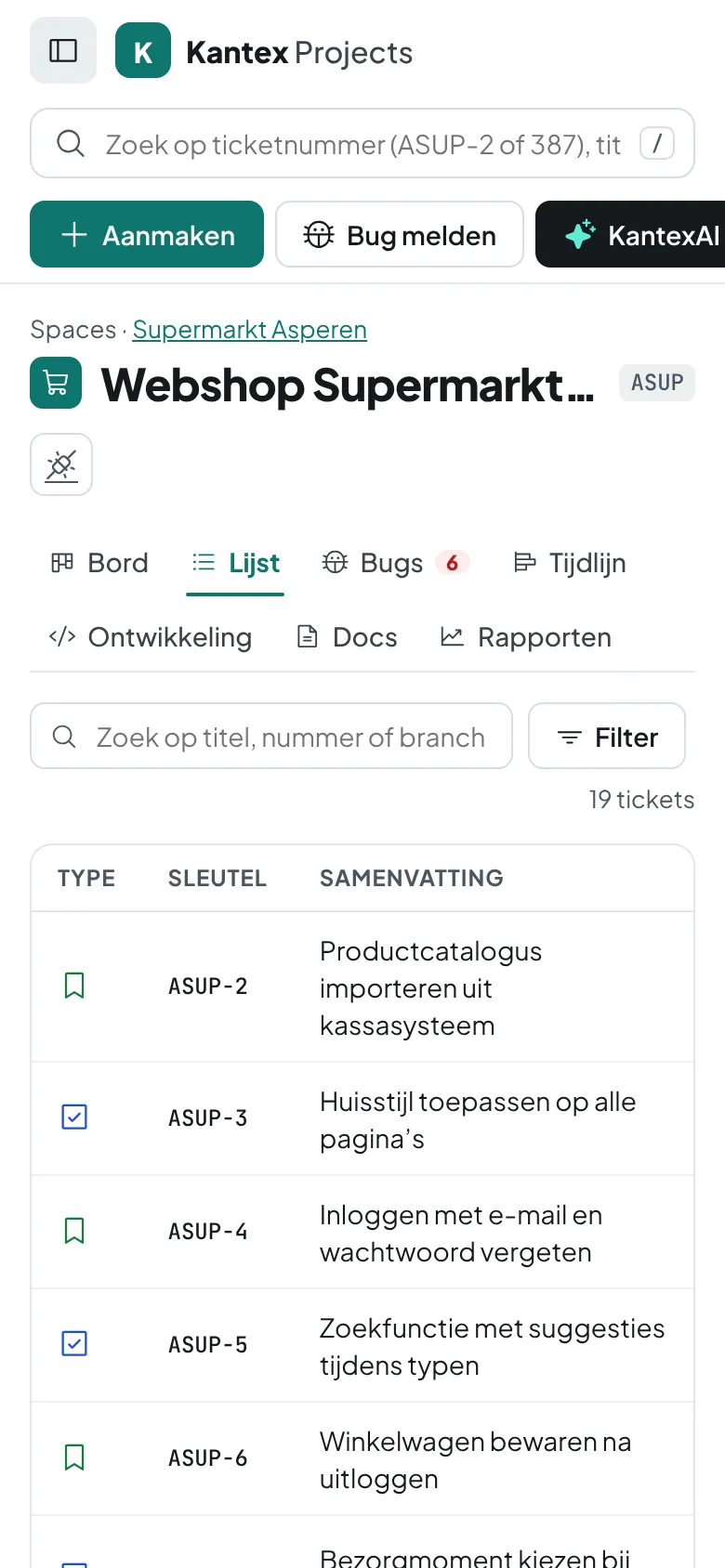
Kantex Projects on a phone
ASUP-12 · pull request opened Code scan: 2 new bugs created
  • Free for up to 5 usersNo credit card, no trial period
  • Clients don’t countUnlimited clients in the portal
  • Cancel monthlyNo annual contract required
  • Your data is yoursHosted in the EU, always exportable
From report to merge

Everything that belongs to a ticket, in one place

The whole project at a glance

  • Drag tickets between columns, with undo
  • Labels, severity, subtasks and the latest branch on every card
  • List and timeline views of the same tickets
Try it yourself
Kanban board with tickets by status
Everything in one package

What you get

  • Board, list and timeline

    Drag tickets across the board, filter the list and plan epics on the timeline.

  • Bug tracker

    Severity, environment and steps to reproduce. KantexAI fills in what is missing.

  • A branch per ticket

    The ticket number in the branch name links the branch, commits and pull request.

  • Code scan on every push

    Problems in your code become bugs on the board, without duplicate reports.

  • Client portal

    Clients see only their own spaces and report bugs themselves.

  • Fixed label structure

    Labels such as type:bug and area:frontend, plus a client label added automatically.

  • Search everything

    By ticket number, title, branch, label or client. Press / and type.

  • KantexAI and MCP

    Ask KantexAI about your tickets, or connect Claude and Cursor via MCP.

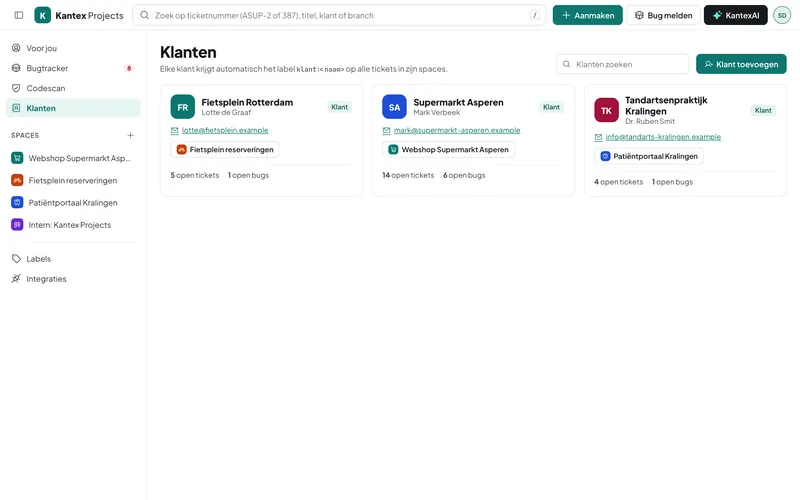
Clients and their spaces in Kantex Projects
Multiple clients and teams

A separate space for every client

  • One or more spaces per client, each with its own ticket numbers
  • Team members see everything, clients only their own spaces
  • Invitations by email, sign-in without a password
  • Roles: admin, team member and client
AI agent and MCP

Just ask your AI assistant

KantexAI knows your tickets, bugs and branches. Ask what is still open, have a bug report worked out, or connect Claude, Cursor or your own agent through the MCP server. For each token you choose whether the agent may read, write or delete.

How the MCP connection works

Vraag: Which critical bugs are still open for Supermarket Asperen, and has anyone created a branch for them yet? Antwoord: There are 2 critical bugs open in ASUP. ASUP-14 (iDEAL payment fails) has branch fix/ASUP-14-ideal-callback with an open pull request. ASUP-17 (prices not visible on mobile) has no branch yet and is unassigned.

via mcp.kantex.nl · list_bugs
Why switch

Fewer systems, less retyping

What you now spread across a ticketing system, a shared folder, loose spreadsheets and emails with clients comes together in one system in Kantex Projects.

Separate tools + email compared with Kantex Projects
What you needSeparate tools + emailKantex Projects
The branch, commits and pull request per ticket Searching Git and hoping Included
Clients report bugs in their own portal Bugs by email or WhatsApp Included
The code scan creates bugs itself Manual code review Included
Clients see only their own project Shared boards or exports Included
Free for up to 5 users, clients don’t count Paying per client account Included
KantexAI and MCP server Not available Included
Pricing

Fair monthly pricing, cancel monthly

  • Free

    For small teams getting started

    €0 / month excl. VAT

    Always free, no credit card needed

    • Board, list and timeline
    • Bug tracker
    • GitHub & Bitbucket
    • MCP server
    • Up to 5 users
    Start with Free
  • Business

    With code scan and KantexAI

    €13 / user / month excl. VAT

    Billed monthly, cancel whenever you like

    • Everything in Team
    • Code scan on every push
    • KantexAI: bug write-ups and triage
    • Up to 99 users
    Try Business free for 14 days
Build your own package with modules
  1. A workspace in 2 minutes

    Your company name and email address. You sign in with a link in your email, no password needed.

  2. Connect your repositories

    Add a webhook in GitHub or Bitbucket. We transfer your existing tickets for you.

  3. Invite your team and clients

    Team members see everything, clients only their own spaces. Free for up to 5 users.

Custom software and integrations

Something Kantex Projects doesn’t do yet? We’ll build it.

Kantex Projects comes from a software agency and is used every day to build software for clients. The same team builds integrations and custom software.

Book a free introductory call
  • Integrations

    Tickets from your support system, hours to your accounting.

  • Git workflows

    Your own rules for branches, reviews and releases.

  • Custom scan rules

    Code scan rules for your stack and conventions.

  • AI solutions

    KantexAI tasks tailored to how you work.

Prefer to see it first? Book a 30-minute demo

We show you Kantex Projects based on your situation: your repositories, clients and way of working. Online, at a time that suits you.

  • No sales pitch, just answers to your questions
  • A tailored price proposal on the spot
  • Your trial environment ready immediately
Choose a time

Switching? We do the work

We transfer your projects, tickets, labels and comments from Jira, Trello or Asana during the trial. You test with your own work.

  1. Day 1Account and intake
  2. Days 2–3Data transferred
  3. Week 1Live with your team
See how it works

Frequently asked questions

Is Kantex Projects really free for up to 5 users?

Yes. Up to 5 users you pay nothing, with no trial period and no credit card. Clients you invite do not count as users. The client portal, code scan and KantexAI are included in Team and Business.

How does Kantex know which branch belongs to which ticket?

Put the ticket number in the branch name, for example feature/ASUP-12-login. On the first push, Kantex links the branch to ASUP-12 and moves the ticket to In progress. Commits containing the ticket number and pull requests are linked too. You can also link a branch manually.

Does it work with GitHub and Bitbucket?

Yes, with GitHub and Bitbucket Cloud, even side by side. You set up a webhook per repository. Pushes, pull requests and smart commits then come in automatically.

What do my clients see?

A client sees only the spaces of their own company: the board, the tickets and the bugs. They can report bugs and comment, but cannot delete anything. Internal spaces stay hidden.

Can I bring my tickets over from Jira?

Yes. During the trial we transfer your projects, tickets, labels and comments from a Jira, Trello or Asana export.

Where is my data stored?

Kantex Projects runs on servers in the EU. You can export your data at any time, including if you leave.
Try Kantex Projects free for 14 days

Full features, your own environment and help with the switch. No credit card needed.

  • No credit card
  • Cancel monthly
  • Support from the Netherlands